A separate Mac arrived as an early release candidate
On November 3, the terminal-mac project published version 0.2.0-6 for Apple silicon. Its early release candidate runs a macOS guest through Apple’s Virtualization framework, then uses a helper inside that guest to capture the screen and carry agent input. A terminal can display the guest while the agent works there.
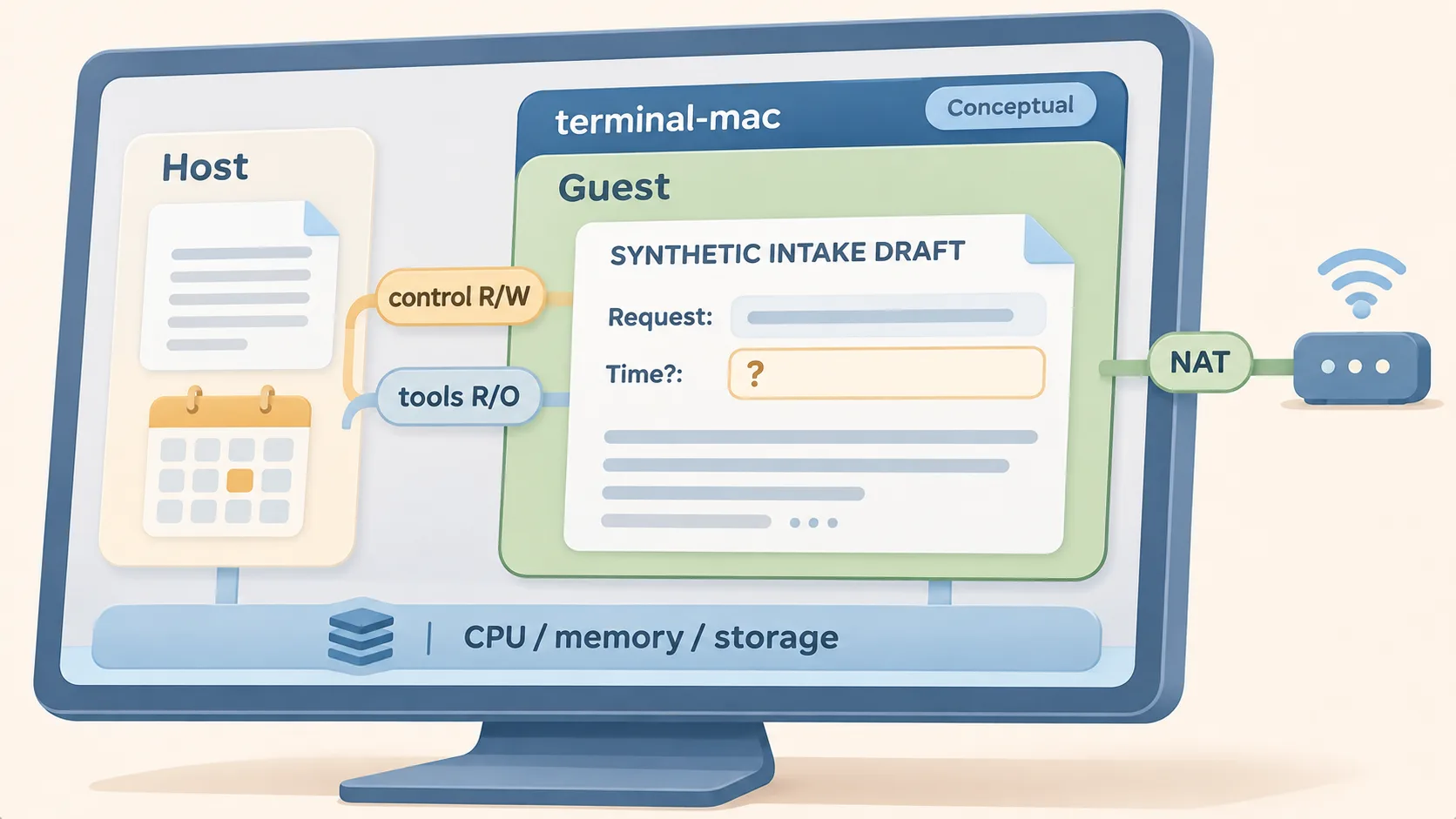
The practical idea is simple: let an agent operate a dedicated guest desktop while the owner continues using the physical Mac. The guest has its own apps, files, accounts, and permissions; it does not inherit the host’s running apps or signed-in sessions. Keeping the agent’s clicks in a guest could reduce interruption to the owner’s pointer and foreground work. It does not make the virtual machine independent of the host: it still uses host CPU, memory, and storage.
A service request can stop at a draft
Consider a future, controlled exercise with a fictional service request and a sample intake screen. An agent could be asked to enter the supplied details in the guest, identify missing fields, and leave a draft for a person to inspect. Meanwhile, the owner could continue ordinary work on the host. This is a proposed workflow, not a ShepBuild demonstration or customer result.
The useful review questions are concrete: did the agent put each supplied value in the right field, flag what was missing, and leave the host’s work undisturbed? A person would compare the draft with the sample request and decide whether anything should happen next. Keep this exercise away from customer accounts and real customer information. Do not let the agent submit the request, send a message, or trigger a purchase.
Separate control still has defined connections
The tagged documentation describes two guest shares. The control share is read/write and carries request-and-reply data and screenshots; the tools share is read-only and contains the helper app. The host’s home folder, project folders, clipboard, microphone, and camera are not attached. The helper’s screen-recording and accessibility permissions are granted inside the guest, not on the host.
Those boundaries help explain what is separated, but they do not establish a hardened security sandbox. Default NAT gives the guest network access and may let it reach services on the host or local network. The documented offline option removes the guest network device, while the shared control channel and host resource use remain. A virtual desktop also says nothing by itself about where an AI model runs or what data its provider receives. Check that model and tool data path separately.
Setup and acceptance are still open work
The tagged release targets Apple silicon and macOS 14 or later. Its first run is guided: someone completes macOS Setup Assistant, creates a guest account, opens the helper in the guest, and approves Screen Recording and Accessibility there. The project calls the release self-signed and not notarized. This is manual setup, not an unattended guest account or an instant business workflow.
The current main-branch validation document reports protocol and packaging checks dated November 1 for a package labeled 0.2.0-2, a different package from the November 3 v0.2.0-6 release. It still lists clean-Mac guest setup and live control acceptance as incomplete. Those checks do not prove that the tagged release has been installed, that an agent can complete an intake task, or that host focus and pointer behavior have been observed.
Make the first evaluation reviewable
If a business later evaluates this pattern, begin with synthetic information and a draft-only task. Write down which guest shares, network mode, tools, and model services are in scope. Have an owner check field accuracy, missing-data handling, host interaction, and recovery before considering a real workflow. A failure to keep the action inside that boundary is a reason to stop, not to broaden access.
A dedicated guest may offer a useful place for an agent to work without taking over the owner’s desktop. Whether it fits a particular process depends on the actual setup, connections, and acceptance evidence. Map the workflow and its data paths before deciding where an agent should act.